
CLOTHING & SHOESPOST
Twin-backed try-on
/api/v1/virtual-fittingCreate a digital twin from the body input or reuse a digitalTwinId, then apply clothing or shoes to it.
- Output
- Try-on image + reusable digital twin
WEARFITS Virtual Try-On API
Integrate AI apparel and shoe try-on, reusable digital twins, 3D product generation, and estimated clothing size recommendations into your app or storefront.
Full API suite
Choose the workflow your product needs. Every card maps to a documented API operation.
/api/v1/virtual-fittingCreate a digital twin from the body input or reuse a digitalTwinId, then apply clothing or shoes to it.
/api/v1/tryon/clothingUse personImages and productImage for a direct product preview, including a shoe. This endpoint never creates a new twin. For multiple shoe angles, use /api/v1/tryon/shoes with shoeImages.
/api/v1/digital-twinPair a face photo with a full-body photo, silhouette, clothing size, or body measurements. Twins are cached for 30 days; reuse the digitalTwinId for later try-ons.
/api/v1/size-fittingCompare a measurements/clothing-size twin with body-range size charts. Synchronous and non-billable; photo/direct twins are not eligible. Recommendations are estimates.
/api/v1/shoe-3dTurn product photos into GLB assets. Add optional AI texture enhancement and WEARFITS upload for an AR viewer link. For bags, set options.productType to other or auto.
/api/v1/digitization/batchesSubmit up to 500 products per request, with up to 10 images per product. Track asynchronous processing for a whole catalog.
Powerful features
Digital twins are cached for 30 days and can be reused across virtual-fitting requests using digitalTwinId.
Submit up to 500 products per request with up to 10 images each, then track catalog processing through the batch API.
Submit image and 3D generation work, then poll GET /api/v1/jobs/{id} with the creating API key or receive a signed webhook. Size fitting is synchronous.
Webhooks use HMAC-SHA256. Ordinary API-key requests use SHA-256 of that key as the signing secret; account and storefront flows use account-derived ownership. Job and batch callbacks use different JSON signing formats; follow the integration playbook.
API at a glance
Developer experience
Start with direct photo-to-photo clothing try-on. This request creates a preview job without generating a digital twin.
Run on your backend. Replace example.com URLs with accessible images you are authorized to use, set WEARFITS_API_KEY, then use the returned jobId. The response below is an illustrative excerpt. Poll with the same API key that created the job.
View integration documentation ↗01 · SUBMIT
curl https://api.wearfits.com/api/v1/tryon/clothing \
  -H "X-API-Key: $WEARFITS_API_KEY" \
  -H "Content-Type: application/json" \
  -d '{
    "personImages": ["https://example.com/person.jpg"],
    "productImage": "https://example.com/shirt.jpg",
    "productCategory": "top"
  }'
02 · RESPONSE EXCERPT
{
  "jobId": "YOUR_JOB_ID",
  "statusUrl": "https://api.wearfits.com/api/v1/jobs/YOUR_JOB_ID"
}
03 · POLL WITH THE SAME KEY
curl https://api.wearfits.com/api/v1/jobs/YOUR_JOB_ID \
  -H "X-API-Key: $WEARFITS_API_KEY"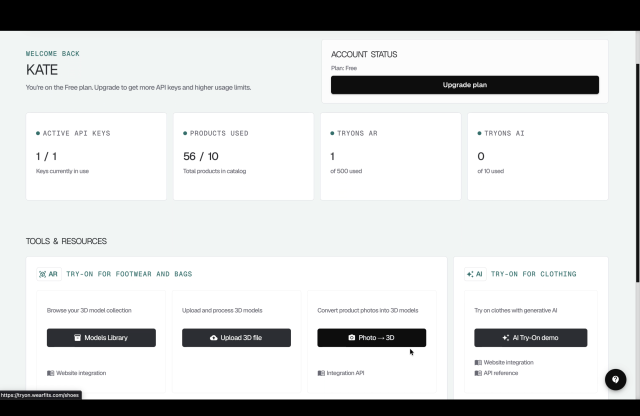
Dashboard & usage
Access & pricing
API usage, AR storefront plans, and integration support serve different needs. Check current terms for your account.
Plan for the try-on, digital twin, and 3D generation operations your application uses. Check the current commercial terms for your account.
AR viewer and storefront plans are a separate product decision. Choose the catalog and interaction allowances that match your store.
Discuss your storefront, catalog size, and technical requirements with WEARFITS to choose an appropriate integration and access arrangement.
Choose your integration
The hosted iframe is the recommended full UI and size-fitting path. Choose the direct API when you own the backend and interface.
Recommended for storefronts
WEARFITS hosts the complete try-on UI and size-fitting overlay. The storefront does not expose an API key. Follow READY/INIT and product handoff in the guide.
Your backend. Your interface.
Build a custom experience with documented REST endpoints. Keep your API key private on your server, submit jobs, then poll or receive a signed webhook.
A smaller modal integration
Load /widget/tryon.js for an API-backed modal. It does not include the hosted size-fitting overlay. Use a server-side proxy to keep your API key private.
The widget is a lightweight API-backed modal without the hosted size-fitting overlay; for the complete UI use the hosted iframe.
Embed https://tryon.wearfits.com/?sizeFitting=true. Put the optional sizeChart sibling field on each WEARFITS_INIT.payload.products[] item; SET_PRODUCTS uses the same product shape. The chart requires version: 1, basis: "body", unit: "cm" or "in", and body ranges for height, chest, waist, hip, or inseam. Size guidance requires a measurements/clothing-size twin with a stored body profile. A full-body/photo input can still produce try-on results but does not produce size guidance. For a direct integration, call POST /api/v1/size-fitting with the eligible digitalTwinId and chart after the twin job completes.
Use a body basis and cm or in units, rather than garment dimensions. Read the hosted integration guide
Use the hosted iframe for a storefront and the complete try-on plus size-fitting UI; use the direct API when you own the backend and UI; choose the lightweight widget only when its API-backed modal is sufficient.
Follow https://tryon.wearfits.com/docs/integration.html for READY/INIT and base product handoff. Put the optional sizeChart sibling field on each WEARFITS_INIT.payload.products[] item; SET_PRODUCTS uses the same product shape. The chart requires version 1, basis "body", unit "cm" or "in", and body ranges for height, chest, waist, hip, or inseam. Test https://tryon.wearfits.com/demo_tryon.html. The hosted storefront integration does not expose a service API key.
For a custom backend and UI, check each operation and its security overrides at https://api.wearfits.com/doc and keep required credentials server-side.
Submit the documented digital-twin or virtual-fitting operation, then poll GET /api/v1/jobs/{jobId} or use a signed webhook until completion.
For developers & AI agents
Explore operations and request schemas.
OpenAPI JSONGenerate clients from the published contract.
llms.txtConcise API context and link map.
Full agent contextExpanded endpoint and integration guidance.
Integration playbooksSkills for AI coding assistants.
Markdown overviewThis page in a retrieval-friendly format.
API summaryA compact guide to the API surface.
Try-on guideTwin-backed and direct photo workflows.
Digital twin guideInputs, reuse, and eligibility.
3D generation guideProduct photos to GLB assets.
Batch guideDigitize a product catalog.
GlossaryPrecise definitions of API concepts.
Frequently asked questionsAnswers to common integration questions.
POST /api/v1/virtual-fitting always creates or reuses a digital twin. POST /api/v1/tryon/clothing uses a person photo, or the image of an existing digitalTwinId, without generating a new twin. Both support productImage for a direct two-image try-on.
For POST /api/v1/digital-twin, supply faceImage plus exactly one body input: bodyPhotoUrl, silhouetteImage, clothingSize, or bodyMeasurements. Inline POST /api/v1/virtual-fitting photo mode requires faceImage plus photoUrl for new generation. Digital twins are cached for 30 days; save the completed job’s digitalTwinId to reuse the avatar.
No. A try-on image is a visual preview. POST /api/v1/size-fitting separately returns estimated size guidance using an eligible measurements/clothing-size twin and merchant body-range charts. Photo/direct twins return available: false. This synchronous operation is non-billable.
Generation runs asynchronously; cache hits may already be completed. Poll GET /api/v1/jobs/{jobId} with the same authentication ownership. Merchant and bare service keys must use the submitting key and support private-key-derived HMAC webhook verification. Prefer authenticated polling for account-attributed and storefront requests; see /llms-full.txt for callback limitations and verification.
POST /api/v1/shoe-3d generates GLB assets from product photos, with optional texture enhancement and WEARFITS AR upload. For bags, set options.productType to "other" or "auto". POST /api/v1/digitization/batches accepts up to 500 products and 10 images per product. Live AR is a separate viewer experience, not the photo try-on endpoint.
For storefronts, use the hosted iframe for the complete try-on and size-fitting UI. Use the REST API from your backend when building your own UI. The lightweight /widget/tryon.js modal does not include the hosted size-fitting overlay. Keep merchant and service API keys server-side; use a storefront token or backend proxy for browser integrations.
The OpenAPI 3.1 specification is available at https://api.wearfits.com/doc, with an interactive reference at /reference. AI agents can start at /llms.txt, read /llms-full.txt, and use the Markdown guides under /docs/.
WEARFITS Virtual Try-On API